If you can see this check that
Essential Apache
Configuring Apache
Apache
- Very well known and respected http server.
- Used commercially.
- Freely available from http://www.apache.org
- Plenty of plugins.
- Relatively easy and flexible to configure.
- Fast and Reliable.
Server Architectures
- In most designs of server, you either use
- Threaded model
- Forking model
- Asynchronous Architecture
- A threaded model needs special OS support to provide lightweight threads. Not used in Apache for security and reliability reasons.
- Forking means that each new request which arrives is handled by a whole process. This is the Apache way.
- Asynchronous. Some web servers exist with this model, where one process handles everything with complex IO code. Good for fast processing of simple web pages.
Apache Forking Model
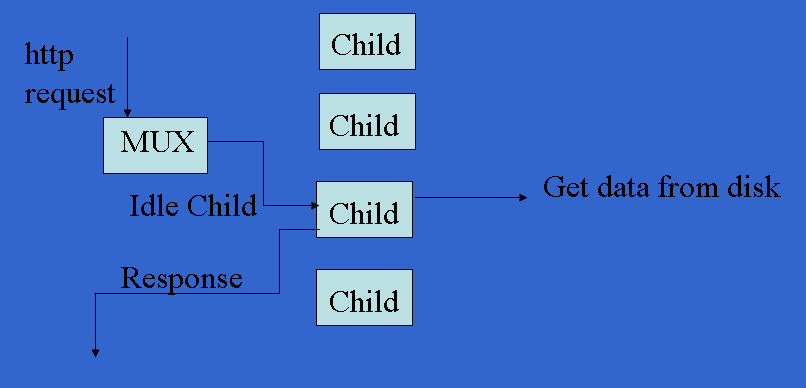
Initial Settings
| StartServers | 8 |
| MinSpareServers | 5 |
| MaxSpareServers | 20 |
| MaxClients | 150 |
| MaxRequestsPerChild | 1000 |
- These options are important, but often the least likely to be changed from the defaults!
Important Files
- /etc/init.d/httpd - the server control script
- /etc/httpd/conf/http.confg - the main conf file.
- Remember when changing the configurations it is only reread on a server reload or restart.
- Errors and other details are logged by default in /var/log/httpd/ as access_log, error_log, as suexec.log.
Reload or Restart
- Reload is the best option to use.
- With a reload, apache checks your configuration file, and switches to it only if it contains no errors.
- If it has errors, it keeps using the old configuration.
- This allows you to reconfigure a server with no downtime.
- Restart shuts down then starts the server...
- Look in the error log for help (e.g. /var/log/httpd/error_log), or syslog (e.g. /var/log/messages).
Remember the command to control services is "service". So to
start apache
service httpd start
stop apache
service httpd stop
reload apache
service httpd reload
Sometimes you will make configuration changes which contain an error.
When you use the service command sometimes these errors are not shown.
If you think there is an error you can use the following command to check
for syntax errors:
service httpd configtest
Mimic a Browser
- To understand how a sever is running is it sometimes useful to make requests at the keyboard of a server and see the results as text.
- Telnet can do this, so long as you have learned some basic HTTP commands.
- The two important ones are:
- HEAD - Give information on a page.
- GET - Give me the whole page.
- In HTTP 1.1 we can use virtual hosts.
- This allows multiple hosts to share a single server.
- Each host has a different name.
- The name of the host you want to answer a query is given as part of a page request.
- This is only supported in HTTP 1.1 and beyond.
$ telnet linuxzoo.net 80
HEAD / HTTP/1.1
Host: linuxzoo.net

HTTP/1.1 200 OK
Date: Mon, 01 Nov 2008 15:06:44 GMT
Server: Apache/2.0.46 (Red Hat)
Last-Modified: Fri, 29 Oct 2008 14:47:22 GMT
ETag: "4981dd-920-22ea7280"
Accept-Ranges: bytes
Content-Length: 2336
Content-Type: text/html; charset=UTF-8
$ telnet linuxzoo.net 80
HEAD / HTTP/1.1
Host: db.grussell.org

HTTP/1.1 200 OK
Date: Mon, 01 Nov 2008 15:08:52 GMT
Server: Apache/2.0.46 (Red Hat)
Last-Modified: Thu, 21 Oct 2008 09:12:33 GMT
ETag: "3c8066-a37-86c9a240"
Accept-Ranges: bytes
Content-Length: 2615
Content-Type: text/html; charset=UTF-8
VirtualHosts
public_html
- Where apache runs on a server used by many different servers, it would be useful for each user to be able to build their own web pages which the server could serve.
- But the virtualhost configuration takes only a single document root, and each user has their own directories in /home.
- You could make the root /home
- All of the files in /home would be accessible, not just web pages.
- It's a bit disgusting...
- Instead, apache supports web pages appearing in a users home directory, under the subdirectory public_html.
public_html access
- Urls of the form
- http://linuxzoo.net/~gordon/file.html
- Refer to
- /home/gordon/public_html/file.html
- This feature must first be switched on in httpd.conf.
- To activate it, find the line
- Then either delete the line, or put "#" (the comment character) in front of it.
- Remember to reload the server.
Linuxzoo tutorials
Web access from the prompt
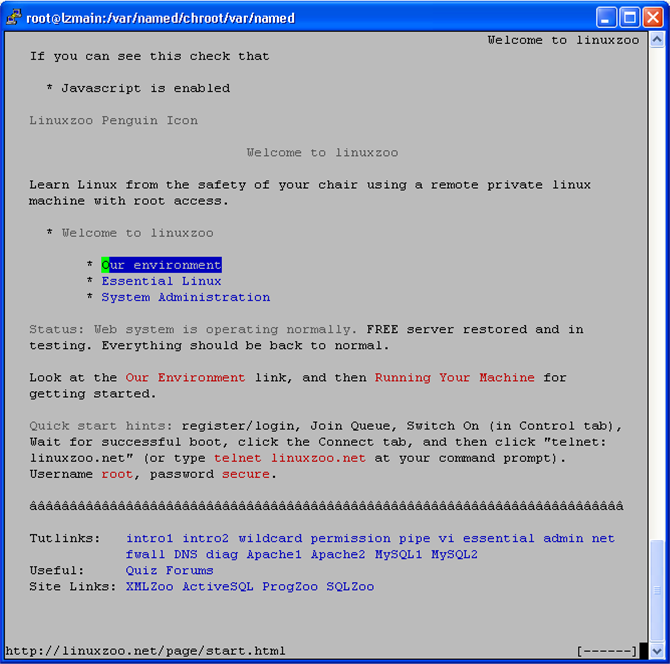
- The prompt is fast and convenient for admin purposes, but when you are debugging http sometimes "telnet" is not sufficient.
- There are a few other tools you can use at the prompt.
- However, there is no simple replacement for actually using a real browser to check your pages.
$ elinks http://linuxzoo.net
Copy http to your directory
- lwp-request http://linuxzoo.net > file.html
- The data is obtained and then printed to the screen.
- In this case that is redirected to file.html
- wget http://linuxzoo.net
$ wget http://linuxzoo.net
--19:20:11--  http://linuxzoo.net/
Resolving linuxzoo.net... 146.176.166.1
Connecting to linuxzoo.net|146.176.166.1|:80... connected.
HTTP request sent, awaiting response... 200 OK
Length: 4785 (4.7K) [text/html]
Saving to: `index.html'
100%[=======================================>] 4,785       --.-K/s   in 0s
19:20:11 (304 MB/s) - `index.html' saved [4785/4785]
SELinux and Apache
You need to take care in the distributions which run SELinux protection.
For security reasons allowing the apache user to read files is not sufficient
to allow files to be accessible from the web. In particular our experiments
all put files into directories under /home/username/public_html/, and the
SELinux security of those directories is quite strong.
When publishing documents from a user's public_html directory, you must
run the following SELinux command:
setsebool -P httpd_read_user_content 1
This is only needed where the httpd_read_user_content is currently 0.
You can check the current value using:
getsebool httpd_read_user_content
Note that setsebool can take tens-of-seconds to run, and it needs to recompile
all SELinux rules and then reload them into the kernel. Be patient.
The filename context type must also be set to httpd_user_content_t. However
this should happen automatically for any file you create in the public_html
directory. If you are having real problems you can check the context using
the following example (which is dealing with a file called index.html):
> ls -Z index.html
-rw-rw-r--. gordon users  unconfined_u:object_r:httpd_user_content_t:s0 index.html
If you discover the type is not "httpd_user_content_t" you can easily set it by doing the following:
chcon -t httpd_user_content_t index.html
However it is very very unlikely you will have to do the chcon to fix your apache server unless you have been doing something really really strange.
mod_rewrite
URL Rewriting
- A useful module in apache is mod_rewrite.
- This allows us to change URLs dynamically.
- This can be useful to, for example,
- Change the URL of aliases in a domain so that they always give the name you want.
- Support directories and files being moved without breaking bookmarked URLs.
- Provide a variety of proxying methods.
Methods
- mod_rewrite has many functions...
- The key functions are:
- RewriteCondition - an IF statement
- RewriteRule - an action (doit) statement.
- These can be placed almost anywhere in the apache configuration files.
- We will concentrate on their use in VirtualHost areas of httpd.conf.
- To work, the area must also have:
RewriteEngine on
rewriteRule
- Basic for of this rule is:
RewriteRule URL-reg-exp New-URL
- For instance, you have moved /old.txt to /new.txt
RewriteRule /old.txt /new.txt
Regular Expressions
- The match comparison is a regular expression.
- Useful aspects of regular expressions include:
- Text matching:
. Any single Character
[chars] One of the characters in chars
[^chars] None of the characters in chars
Text1|Text2 Either "Text1" or "Text2"
Quantifiers and Grouping
- Quantifiers:
? 0 or 1 of the preceding text
* 0 or N of the preceding text
+ 1 or N of the preceding text
- Grouping
(text) A text group - Can mark the border of an alternative or for RHS reference as $N
Anchors and Escaping
- Anchors:
^ Start of the URL
$ End of the URL
- Escaping
\char Allows you to use a character as the "char". For instance, \^ is the ^ character and not the start of the URL.
Back References
- $N corresponds to a group from the URL match.
- For example, rewrite any URL ending in .txt to .html one could write:
RewriteRule (.*)\.txt $1.html
More complex example.
- Rewrite a URL ending with directory /demo/ to use /hia/ instead...
RewriteRule ^(.*)/demo/(.*)$ $1/hia/$2
Additional Flags
- At the end of the RewriteRule can be a number of flags.
- The Flags are listed in [brackets], eg [F,G] for flags F and G.
- These change or enhance the behaviour of the match.
Options:
- R or R=code - This sends the browser the new URL as an external REDIRECTION. The code can be the type or redirection, such as 302 for MOVED TEMPORARILY (the default).
- F - Send back FORBIDDEN.
- G - Send back GONE
- P - Proxy - Forward the request
- L - Last - do not look at any more rules.
- C - chain - If the pattern matches do the next rule, otherwise ignore the remaining rules.
- NC - case insensitive.
- There are many more options, but these are the important ones.
Complex example
RewriteCond
- This command performs tests or RULES.
- If the test matches, then the next test is checked.
- If all tests match, then the RewriteRule which follows the tests is performed.
- If any Cond does not match, processing skips on till after the Rule(s) in this block.
- Basic Form of RewriteCond
RewriteCond TestString ConditionString
- The value of the TestString is compared to the conditionstring.
- Condition String can be any type of regular expression.
- TestString can be one of a huge variety of things, including variables and file tests.
Variables:
- Here are some of the important variables:
- REMOTE_ADDR
- REMOTE_HOST
- HTTP_HOST
- REQUEST_URI (e.g. /index.html) (Yes it is URI not URL).
- REQUEST_FILENAME (e.g. /home/gordon/...)
- You use these as %{REMOTE_ADDR} etc.
- There are over 20 variables available.
Flags
- RewriteCond can take flags in the same way as RewriteRule.
- There are only 2 flags:
- NC - case insensitive
- OR - or the Conds together.
- Normally all rules have to be true before the Rule is done, with OR the rule is done if ANY Cond is true.
Example 1:
Example 2:
Example 3:
- Rewrite *.grussell.org to grussell.org, and *.grussell.org.uk to grussell.org.uk.
RewriteEngine on
RewriteCond %{HTTP_HOST} ^.+grussell\.org$
RewriteRule ^(.*)$ http://grussell.org$1 [L,R]

RewriteCond %{HTTP_HOST} ^.+grussell\.org\.uk$
RewriteRule ^(.*)$ http://grussell.org.uk$1 [L,R]
Discussions
Discussion
- Apache runs as a user, usually "apache" or "httpd". For apache to serve a file from a user's public_html directory, what permissions would be required?
Discussion
- Here are some mock exam questions you should now be able to answer:
Question 1
- To test a web server which is hosting the virtual host "grussell.org", using only telnet, what would you type at the telnet prompt?
Question 2
What fields would you expect to have to define in a VirtualHost definition in apache?
Question 3
Supply mod_rewrite instructions such that a request for http://grussell.org/~uta gets redirected externally and permanently to http://upriss.org.uk.
Linuxzoo created by Gordon Russell.
@ Copyright 2004-2023 Edinburgh Napier University