If you can see this check that
| next section | prev section | up | prev page | next page |
AllowOveride AuthConfig
> htpasswd -c /home/gordon/password andrew
New Password: *******
Retype New Password: *******
Adding password for user andrew.
-c is only the first time running the command, as this creates the file too. Miss out -c after the first run.
AuthType Basic
AuthName "Restricted Files"
AuthUserFile /home/gordon/password
Require user andrew
Require user andrew
Require valid-user
staff: gordon andrewAdd to .htaccess
AuthType Basic
AuthName "By Invitation Only"
AuthUserFile /home/gordon/password
AuthGroupFile /home/gordon/groups
Require group staff
order allow,deny
allow from all
deny from 10.0.0.1
order allow,deny
allow from all
deny from 10.0.0.1
order allow,deny
deny from 10.0.0.1
allow from all
order allow, deny
deny bob.com jim.com
allow all
order deny, allow
deny 10.0.1.0/24
deny 10.0.0.2
allow all
<VirtualHost>
...
	ErrorLog logs/gr-error_log
  	CustomLog logs/gr-access_log combined
</VirtualHost>
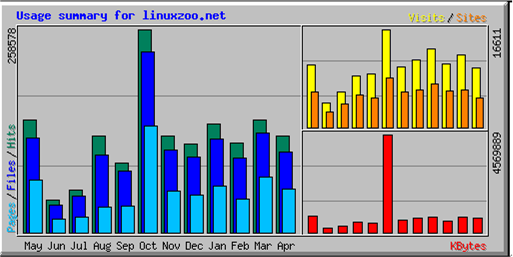
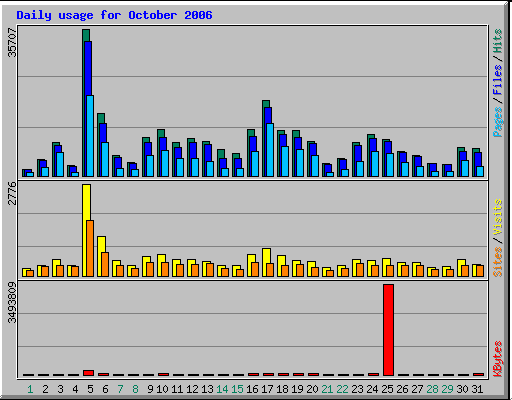
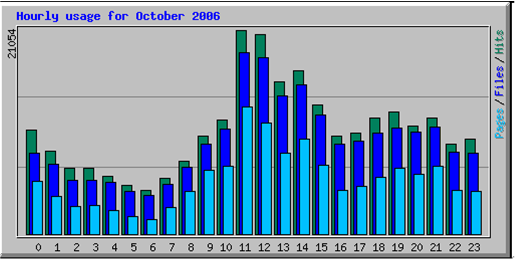
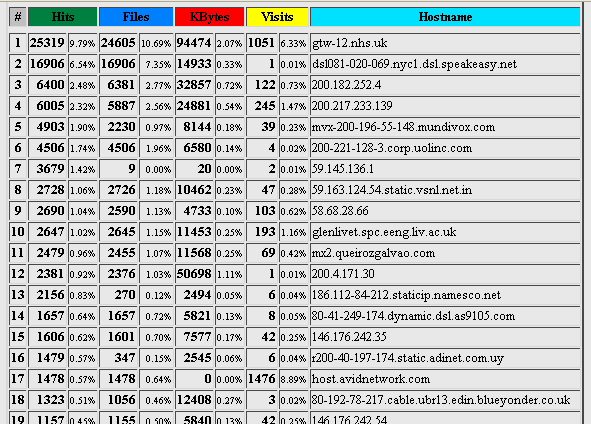
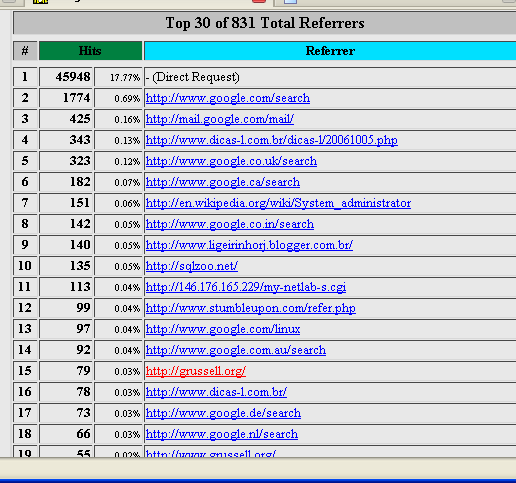
%h %l %u %t %r %>s %b Referrer UserAgent
#!/bin/sh
echo 'Content-Type: text/html; charset=ISO-8859-1'
echo
echo '<body><pre>'
whoami
env
echo '</pre></body>'
apache SERVER_SIGNATURE=Apache/2.0.51 (Fedora) Server at servername Port 80
UNIQUE_ID=umn4CZKwogYAADNFYkcAAAAI HTTP_KEEP_ALIVE=300
HTTP_USER_AGENT=Mozilla/5.0 (Windows; U; Windows NT 5.1; en-GB; rv:1.9.0.1) Gecko/2008070208 Firefox/3.0.1
SERVER_PORT=80
HTTP_HOST=servername DOCUMENT_ROOT=/home/gordon/public_html HTTP_ACCEPT_CHARSET=ISO-8859-1,utf-8;q=0.7,*;q=0.7 SCRIPT_FILENAME=/home/gordon/public_html/who.cgi REQUEST_URI=/who.cgi
SCRIPT_NAME=/who.cgi
SCRIPT_URI=http://servername/who.cgi
HTTP_CONNECTION=keep-alive
REMOTE_PORT=1234 PATH=/sbin:/usr/sbin:/bin:/usr/bin:/usr/X11R6/bin
SCRIPT_URL=/who.cgi
PWD=/home/gordon/public_html SERVER_ADMIN=me@grussell.org HTTP_ACCEPT_LANGUAGE=en-gb,en;q=0.5 HTTP_ACCEPT=text/html,application/xhtml+xml,application/xml;q=0.9,*/*;q=0.8
REMOTE_ADDR=50.50.50.1
SHLVL=1
SERVER_NAME=servername SERVER_SOFTWARE=Apache/2.0.51 (Fedora)
QUERY_STRING= SERVER_ADDR=146.176.162.6 GATEWAY_INTERFACE=CGI/1.1 SERVER_PROTOCOL=HTTP/1.1 HTTP_ACCEPT_ENCODING=gzip,deflate REQUEST_METHOD=GET _=/bin/env
	user apache
	group apache
	ServerSignature Off
	ServerTokens Prod
<Directory />
	Order Deny,Allow
	Deny from all
</Directory>
Options -Indexes
$ chown -R root:apache /etc/httpd
$ chmod -R u=rwx,g=r,o-rwx /etc/httpd
$ iptables -A OUTPUT -m owner
		--uid-owner apache
                -m state --state NEW
           	-j DROP
Auth Type Basic
AuthTitle "Password Required"
AuthUserFile home/jim/.www-password
<Limit GET POST>
Required user jim
</Limit>
AuthType Basic
AuthName "Password Required"
AuthUserFile /home/09006754/.www-password
<Limit GET POST>
Require user server_admin
</Limit>
157.55.18.25 - - [31/Aug/2011:12:48:04 +0100] "GET /robots.txt HTTP/1.1" 200 48 "-" "Mozilla/5.0 (compatible; bingbot/2.0; +http://www.bing.com/bingbot.htm)"
| Centos 7 intro: | Paths | BasicShell | Search |
| Linux tutorials: | intro1 intro2 wildcard permission pipe vi essential admin net SELinux1 SELinux2 fwall DNS diag Apache1 Apache2 log Mail |
| Caine 10.0: | Essentials | Basic | Search | Acquisition | SysIntro | grep | MBR | GPT | FAT | NTFS | FRMeta | FRTools | Browser | Mock Exam | |
| CPD: | Cygwin | Paths | Files and head/tail | Find and regex | Sort | Log Analysis |
| Kali: | 1a | 1b | 1c | 2 | 3 | 4a | 4b | 5 | 6 | 7a | 8a | 8b | 9 | 10 | |
| Kali 2020-4: | 1a | 1b | 1c | 2 | 3 | 4a | 4b | 5 | 6 | 7 | 8a | 8b | 9 | 10 | |
| Useful: | Quiz | Forums | Privacy Policy | Terms and Conditions |
Linuxzoo created by Gordon Russell.
@ Copyright 2004-2023 Edinburgh Napier University